

According to McKinsey, 47% of MarTech decision-makers cite stack complexity as well as system and data integration challenges as key blockers that prevent (or could prevent) them from getting value from their tools.
Read that again. Not tool selection. Not budget overruns. Not a lack of executive buy-in. Integration complexity. And if you’ve ever sat across from a vendor during a sales demo, you probably know exactly how that happens. You see a polished interface, a few clicks, and suddenly you’re looking at clean journey maps and attribution models that appear to build themselves. It can feel as if your data showed up clean, complete, and perfectly structured on its own.
It didn’t. It never does.
In MarTech, “ease of use” is often mistaken for “ease of implementation”, and that confusion creates real issues. Teams sign contracts expecting a smooth six-week onboarding and later find themselves twelve months in, still troubleshooting data layer inconsistencies and debating what qualifies as a “session.”
The truth is that “Enterprise” doesn’t automatically mean difficult or complex, and “Standard” doesn’t automatically mean easy or simple. The real complexity lives in the architecture behind the scenes, not the product tier on the pricing page.
At Drumline, we’ve implemented analytics tools across the spectrum, from free Google Analytics setups, to multi-brand, multi-region Adobe stacks, to Amplitude, a recent addition to the Forrester Wave leaders in Digital Analytics Solutions. This post takes a closer look at what it actually takes to get clean, reliable data flowing, comparing the implementation demands of Adobe, Google, and Amplitude.
Key takeaways
- Choosing the wrong tool for your team’s capabilities is often more costly than choosing the “wrong” tool on paper. Match your stack to the shape of your team, not just your feature wishlist.
- Adobe, Google, and Amplitude each come with distinct implementation complexities.
- Adobe Customer Journey Analytics (CJA), while powerful, demands significant architectural overhead due to its rigid data hierarchy.
- Google Analytics (GA4) is easy to install but harder to implement because it relies on strict pre-definition requirements.
- Amplitude offers a flexible “capture first” model that supports faster time-to-insight for many teams.
The “Russian Doll” problem: Adobe CJA
Adobe CJA is often considered the gold standard for power users, but that power comes with a significant architectural tax.
If you are migrating to Adobe CJA, you aren’t simply installing a tracking script. You are building a rigid data hierarchy. Think of the setup like nested containers, each layer unlocking the next. Setting up a single data flow in Adobe requires configuring a chain of dependent objects:
- Schema: Defining the XDM structure
- Dataset: The storage container for data matching that schema
- Datastream: The pipeline configuration from application to Adobe Experience Platform
- Connection: Linking the dataset(s) for reporting
- Data View: The lens through which you actually see reports
Here’s the part teams often overlook: the biggest value of a CJA implementation frequently comes not from CJA itself, but from the stronger data foundation they had to build to support it. That can be a challenge, but it can also be a strategic advantage. If you go into a CJA implementation expecting the tool to do the heavy lifting, the experience will feel frustrating. If you go in understanding that you’re building a data infrastructure with CJA as the reporting layer on top of it, you’ll find a platform with a remarkably high capability ceiling.
The Reality: This data structure is genuinely powerful for governance. Nothing enters your system without a passport. But it’s also a heavy lift. It requires a dedicated architect to configure and an ongoing owner to maintain. If your team doesn’t have the capacity to manage these “Russian Dolls,” your implementation will stall long before anyone runs a report. Adobe’s own documentation notes that most organizations evaluating a migration to CJA need to account for this multi-layer setup before a single row of data is usable.
The “silent failure” trap: Google Analytics 4 (GA4)
GA4 is often viewed as the “easy” option because the base installation is quick and the platform is free, so how hard can it be? Add the tag, and data starts appearing almost immediately. For many teams, that quick win creates the impression that meaningful insights will follow just as easily.
But “easy to install” is not “easy to implement.”
The complexity in GA4 comes from its strict, event-based structure. Unlike its predecessor, Universal Analytics (UA), GA4 requires you to define most dimensions and parameters before data is collected. If you don’t explicitly configure custom (and some “standard”) dimensions in advance, that data is unavailable in the interface until the dimensions are configured. For the average marketer relying on the interface, this can result in gaps they only discover when they go to analyze performance.
There’s also a retention constraint layered on top of this. GA4 caps event-level data at 14 months within the interface for standard accounts. You can route everything to BigQuery to work around this, but then you’re not using an analytics tool; you’re building a data warehouse project requiring SQL engineers to surface what should have been a simple report.
The Reality: GA4 works well when teams have the planning discipline to define their measurement needs upfront and the engineering support to extend the platform through BigQuery. Without that alignment, GA4 can give the illusion of visibility while quietly blocking access to the very insights teams need.
The “capture first” approach: Amplitude
In our most recent implementation, Amplitude has surprised us by sitting in a “sweet spot” of complexity.
Architecturally, Amplitude behaves more like Google than Adobe (there is an option for a single “autocapture” script), but with a critical difference in philosophy compared to either: It records the data first and lets you define it later. That’s a meaningful distinction in practice.
- Fewer moving parts: There is no complex chain of schemas and datasets to configure before you can track a button click.
- Flexible governance: Data arrives immediately. If it’s messy, you can clean it up using Derived Properties, Drop Filters, or Lookups directly in the interface after the fact. Amplitude’s Data Mutability feature even allows retroactive corrections to align historical data with warehouse changes.
However, flexibility is not a substitute for strategy. Amplitude won’t enforce discipline for you. If the tracking plan is vague or inconsistent, the freedom to collect everything can create unnecessary noise. Teams still need alignment on what matters and why.
The Reality: Amplitude’s implementation complexity is lower than Adobe’s because it removes the middleware. It assumes you want the data and gives you tools to manage it, rather than requiring you to prove you need it before it’s allowed in the door. The trade-off is that you still need to decide which events to track up front and how you structure them. Amplitude won’t save you from a poorly designed tracking plan; it just makes it easier to course-correct when your thinking evolves.
A framework for matching tools to teams
By now, the pattern should feel clear: every platform on this list has real implementation complexity. It just shows up in different ways. None of these tools are truly “easy to implement” in any meaningful enterprise sense, and none of them are unreasonably difficult either. They are tools, and their success depends on the expertise and process of the people implementing them.
When we advise clients on stack selection, we look at team shape as closely as feature lists. A 2025 survey by GNW Consulting and Demand Metric found that 31% of MarTech implementations failed or delivered neutral results, with cross-functional misalignment cited by 49% of respondents as a leading cause. That number likely understates the reality since failed implementations are often underreported.
The tool is rarely the root problem. The mismatch between tool complexity and team capability is.
Ask these questions first:
- Do you have a dedicated data architect? If not, Adobe’s multi-layer setup may create bottlenecks early.
- Can you define every dimension you’ll need before data collection begins? If not, GA4 without BigQuery will be frustrating for your marketing team.
- Do you need to move fast with a lean team? If so, Amplitude’s capture-first approach may help you reach insight faster.
- What are your governance requirements? Certain regulatory contexts may genuinely benefit from Adobe’s passport-style strictness.
Will the tool you select support your business in 3-5 years? Plan for the capability ceiling, not just the starting line.
The decision framework:
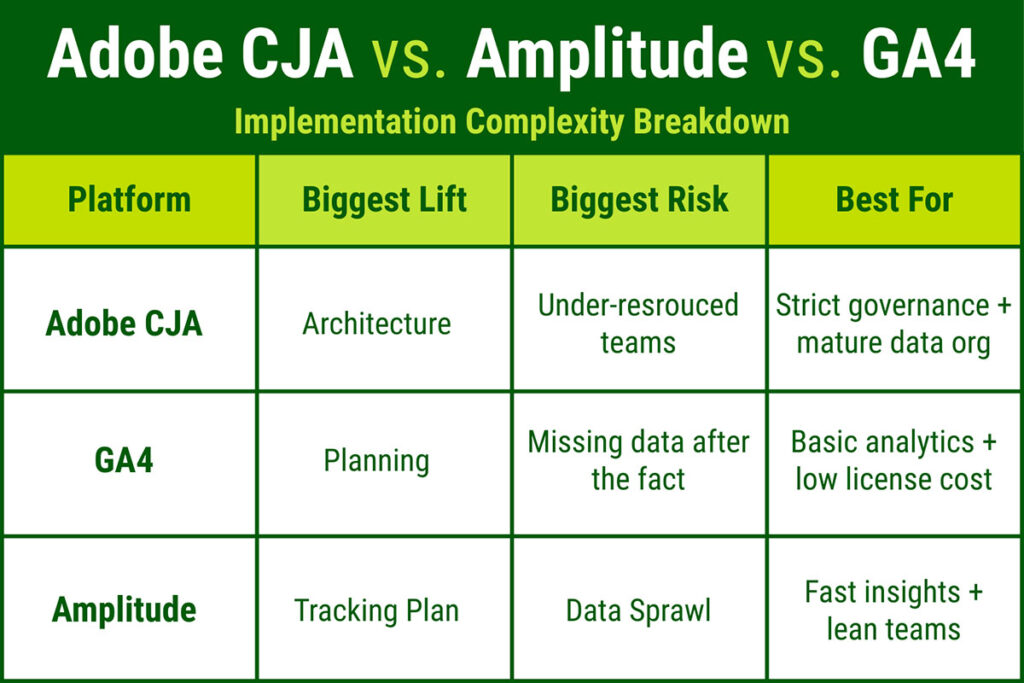
Choose Adobe CJA if you have a dedicated product or data team, strict governance requirements, and the organizational patience to build and maintain a sophisticated data architecture. The complexity pays off for teams equipped to support it.
Choose Amplitude if you want enterprise-grade capabilities (A/B testing, cohorts, journey maps) but need to move quickly with a lean team. It offers the fastest time-to-insight of the three.
Choose GA4 if you’re budget-constrained and have SQL engineering resources available to extend the platform through BigQuery. Go in with eyes open about the downstream lift required.
How teams should collaborate on tool selection
Implementation isn’t a one-time project; it’s a permanent workflow. The best outcomes we’ve seen happen when alignment exists across all three functions before a contract is signed:
- Marketing leaders define business questions upfront, not after the tool is live.
- Analytics teams build a governance playbook that balances flexibility with data quality.
- IT teams assess architectural requirements before procurement.
Don’t purchase a Ferrari if you only have a mechanic who knows how to fix a bicycle. More to the point: don’t let IT buy a Ferrari when Marketing needs to drive it daily. And if you genuinely need that Ferrari, invest in a skilled mechanic and an experienced driver before you begin, not after you’ve already signed the lease.
Key recommendations
- Match architectural complexity to team capacity, not just to feature lists.
- Involve Marketing, Analytics, and IT in tool selection from the start.
- Define governance requirements early, especially in regulated industries.
- Budget for ongoing maintenance, not only initial implementation.
If you’re working through how to match the right analytics tool to your team’s actual capabilities, let’s talk. We’ve helped organizations across industries make this decision with confidence, and we know what a well-matched implementation looks like on the other side.
Adobe CJA vs GA4 vs Amplitude FAQs
Which analytics platform is best for a lean marketing team: Adobe CJA, GA4, or Amplitude?
For lean teams, Amplitude is often the most practical starting point because it requires less architectural setup than Adobe CJA and offers more flexibility after data collection begins. GA4 can work well for budget-conscious teams, but it requires upfront planning and may need BigQuery support to answer more advanced questions. Adobe CJA is typically a better fit for organizations with dedicated analytics, data architecture, and governance resources.
How should teams choose between Adobe CJA, GA4, and Amplitude?
Start with team capacity, not the feature list. Choose Adobe CJA if you have strong governance requirements and the resources to manage a more sophisticated data architecture. Choose GA4 if budget is a primary constraint and you have the technical support to extend it through BigQuery. Choose Amplitude if speed, flexibility, and faster time-to-insight are priorities for a leaner team.
Is Amplitude easier to implement than Adobe Analytics?
Generally, yes. Amplitude requires significantly less architectural setup than Adobe CJA. Adobe requires configuring multiple dependent layers (Schemas, Datasets, Datastreams, Connections, Data Views), whereas Amplitude uses a flatter ingestion model that enables faster setup and retroactive data governance. The gap is most pronounced for teams without a dedicated data architect.
Does GA4 require BigQuery for custom data?
Not strictly, but practically, BigQuery is often necessary to unlock GA4’s full value. Without it, the GA4 interface limits high-cardinality dimensions and offers no retroactive processing for dimensions not defined prior to collection. GA4 also caps event-level data retention at 14 months for standard accounts; exporting to BigQuery is the only way to preserve raw data beyond that window.
What is the difference between Adobe CJA and standard Adobe Analytics implementation?
Adobe CJA is built on the Adobe Experience Platform (AEP) and uses XDM Schemas, requiring a database-style setup that’s considerably more complex than the traditional “eVars and props” model of standard Adobe Analytics. The architectural overhead is a meaningful step up, not just a version upgrade.

